A Universal Turing Machine
So we've been saying up till now that a Turing machine can accomplish anything your computer can. But... we've also been simulatinng Turing machines on our computers (think about what Bucklang does). Does that mean there's a Turing machine out there that can... simulate other Turing machines? The answer to this question is "yes!!", and marks a very important turning point in this course that will very quickly bring us to a core concept of computing: the ability for computable functions to exhibit "self-reference".
A String Representation of Turing Machines
The language BuckLang (and many others) are really just notations for Turing machines. If I write
if _ : write 1.goto y
if 0 : write _.goto x
state y
if 1 : write 0.goto x
To make it a little easier to see how to fit this on a tape (due to its line breaks and stuff) we are going to remove unnecessary spaces, replace the syntactical whitespace with \({\#}\), and write line breaks with \({/}\). Then as a string, this can be written to a tape as \[\begin{aligned} &w = \\ &\mathtt{state{\#} x {/} if{\#} \_ {:} write{\#} 1.goto{\#} y {/} if{\#} 0 {:} write{\#} \_.goto{\#} x{/} state{\#} y {/} if{\#} 1 {:} write{\#} 0.goto{\#} x} \end{aligned} \qquad (*)\] This string exists in the alphabet \[ A_{\mathcal U} = \{\mathtt{a}, \dots, \mathtt{z}, \mathtt{:}, \mathtt{\_}, \mathtt{{/}}, \mathtt{{\#}}, \mathtt{*}, 0, 1 \} \] which we will call the programming alphabet. Notice that \(\mathtt{\_}\) is an explicit symbol now, separate from a proper blank. Note also that we have not used the symbol \(\mathtt{*}\) yet. It will play a role in a moment.
-
\(\mathcal T_1 = \)

-
\(\mathcal T_2 = \)
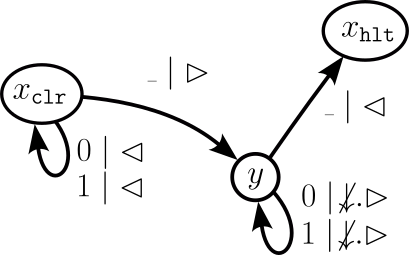
The following theorem tells us that there is a Turing machine out there on which the "code" for any other Turing machine can be run.
There are also a couple things to note about the statement above, based on Church-Turing thesis: first, we could have entirely used \(0\)s and \(1\)s. In fact, this is what your actual physical computer does: it represents every program in binary, including compilers and shells and the operating system itself. So the shell in your computer is a binary string representing a program that takes other binary string representations of programs as input and outputs binary strings representing the outputs of the programs run in the shell. Second, the choice of the BuckLang encoding wasn't exactly Turing's original choice... that is something we came up with. But this just goes to show that there are also many different possible encodings of Turing machines; our specific choice of encoding was somewhat arbitrary.
- \(\mathcal U_c(\mathtt{state\#s1{/}if\#0{:}write\#1{.}halt{*}s1{*}0}) =\)
- \(\mathcal U_c(\mathtt{state\#s1{/}if\#1{:}write\#1{.}halt{*}s1{*}0}) =\)
- \(\mathcal U_c(\mathtt{state\#s1{/}if\#0{:}write\#\_{.}goto\#s1{*}s1{*}0}) =\)
The proof obligation for Turing's Fixed Point theorem is simply to build one. So let's see how that might be done, shall we?
Building a Universal Turing Machine
There are a couple assumptions we are going to make right off the bat, to make things a bit easier for ourselves.
- We are going to use three tapes for this task. I will leave it to you to work out how this construction would operate for a single tape Turing machine (like in the statement of Turing's Fixedpoint theorem).
-
We are going to assume in our Bucklang program that every state specification is of the form
state statenameother than \(\mathtt{state~halt}\), which has no transition specifications. It is not terribly difficult to adapt the construction to the more general syntax (for example, that bucklang.py can manage), but this assumption will significantly reduce the amount of headache to come.
if _ : (tape program).goto otherstatename1
if 0 : (tape program).goto otherstatename2
if 1 : (tape program).goto otherstatename3
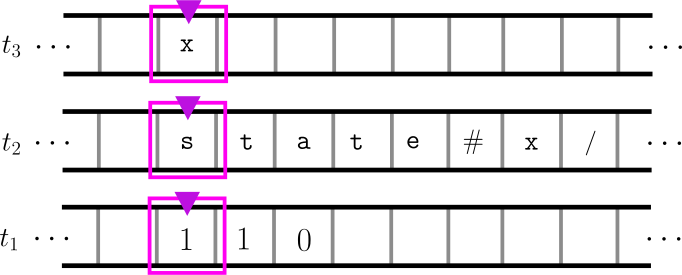 Two tapes for building a universal Turing machine that takes BuckLang encodings of Turing machines.
Tape \(t_3\) contains the starting state name, \(t_2\) contains the encoding of \(\mathcal T\), and \(t_1\) contains the input of the program.
Two tapes for building a universal Turing machine that takes BuckLang encodings of Turing machines.
Tape \(t_3\) contains the starting state name, \(t_2\) contains the encoding of \(\mathcal T\), and \(t_1\) contains the input of the program.
Roughly, the program \(c\) in \(\mathcal U\) (the compiler program) will operate as follows: tape \(t_3\) stores the virtual state, tape \(t_2\) stores the virtual Turing machine \(\mathcal T\), and tape \(t_1\) stores the virtual tape, on which we are going to simulate the operation of \(\mathcal T\). The program starts with the state \(\mathtt{check\_halt}\) below.
-
\(\mathtt{check\_halt}\)
If the virtual state, i.e., the content of \(t_3\), is \(\mathtt{halt}\), then halt. Otherwise, go to \(\mathtt{find\_current\_state}\). This ensures that the current virtual state is not the virtual halting state. -
\(\mathtt{find\_current\_state}\)
Rewind tape head \(t_2\), then scan it to the right until it has read the string \(\mathtt{state\#}s\mathtt{/}\), where \(s\) is the content stored on tape \(t_3\) (if it reaches the end of the tape, halt). Now rewind \(t_3\) and goto \(\mathtt{check\_if\_blank}\).
The tapes should now look like this: \[\tt\begin{array}{l c c c c c c c c c c c r} & \triangledown & & & & & & & & & & & t_3 \\ \hline \cdots & s & & & & & & & & & & & \cdots \\ \hline & & & & & & & & & \triangledown & & & t_2 \\ \hline \cdots & \mathtt{s} & \mathtt{t} & \mathtt{a} & \mathtt{t} & \mathtt{e} & \mathtt{\#} & s & \mathtt{/} & \mathtt{i} & \mathtt{f} & \mathtt{\#} &\cdots \\ \hline % & & & & & & & & & & & & t_1 \\ % \hline % \cdots & a_1 & a_2 & & & & & & & & & & \cdots \\ % \hline \end{array}\] This readies the tape head on \(t_2\) to read the tape program associated with the current virtual state. Concretely, the tape head is situated above the \(\mathtt{i}\) in "\(\mathtt{if\#\_{:}}\)". -
\(\mathtt{check\_if\_blank}\)
Now we check the virtual tape. If the tapehead of \(t_1\) is reading a blank, then scan \(t_2\) to the right until it has read \(\mathtt{if\#\_{:}}\), and then goto \(\mathtt{run\_tape\_program}\). Otherwise, goto \(\mathtt{check\_if\_0}\). -
\(\mathtt{check\_if\_0}\)
Again, we check the virtual tape. If the tapehead of \(t_1\) is reading a \(0\), then scan \(t_2\) to the right until it has read \(\mathtt{if\#0{:}}\), and then goto \(\mathtt{run\_tape\_program}\). Otherwise, goto \(\mathtt{check\_if\_1}\). -
\(\mathtt{check\_if\_1}\)
Again, we check the virtual tape. If the tapehead of \(t_1\) is reading a \(1\), then scan \(t_2\) to the right until it has read \(\mathtt{if\#1{:}}\), and then goto \(\mathtt{run\_tape\_program}\). Otherwise, halt (if the original program is correctly formatted, then we will never reach this point). -
\(\mathtt{run\_tape\_program}\)
The current position of the tape head on \(t_2\) is just to the right of \(\mathtt{if\#}x\mathtt{:}\), where \(x\) is the virtual tape symbol that \(t_1\) is reading. For example, tapes \(t_1\) and \(t_2\) might look like \[\tt\begin{array}{l c c c c c c c c c c c r} % & \triangledown & & & & & & & & & & & t_3 \\ % \hline % \cdots & s & & & & & & & & & & & \cdots \\ % \hline & & & & & & \triangledown & & & & & & t_2 \\ \hline \cdots & \mathtt{i} & \mathtt{f} & \mathtt{\#} & x & \mathtt{:} & \mathtt{m} & \mathtt{o} & \mathtt{v} & \mathtt{e} & \mathtt{\#} & \mathtt{r} &\cdots \\ \hline & \triangledown & & & & & & & & & & & t_1 \\ \hline \cdots & x & \cdots & & & & & & & & & & \\ \hline \end{array}\] We then enter one of the following cases, where we run the virtual program on the actual tape \(t_1\):- if, scanning forward, \(t_2\) reads \(\mathtt{move\#left.}\), then move the tape head of \(t_1\) to the left one cell. Then goto \(\mathtt{run\_tape\_program}\).
- if, scanning forward, \(t_2\) reads \(\mathtt{move\#right.}\), then move the tape head of \(t_1\) to the right one cell. Then goto \(\mathtt{run\_tape\_program}\).
- if, scanning forward, \(t_2\) reads \(\mathtt{write\#}y\mathtt{.}\), then have the tape head of \(t_1\) write a \(y\) to its current position, where \(y \in \{\mathtt{\_},\mathtt{0},\mathtt{1}\}\). Then goto \(\mathtt{run\_tape\_program}\).
- if, scanning forward, \(t_2\) reads \(\mathtt{goto\#}t\mathtt{/}\), then have the tape head of \(t_3\) (the virtual state tape) replace its current contents with the string \(t\). In this case, we goto \(\mathtt{find\_current\_state}\).
- Otherwise, halt (again, if the virtual program is formatted correctly, then we will never reach this point.)
As you can likely imagine, the state space of \(\mathcal U\) is rather large, and fitting it all onto a single tape makes the situation somewhat more complex. The important thing here is that the construction above gives a clear sequence of instructions for actually programming \(\mathcal U\) (as a side-note, it would be extremely cool to see this machine actually implemented in BuckLang!).
if _ : goto halt
if 0 : move right.goto f
if 1 : write 0.move right.goto f
state halt
- \(\mathcal U_c(\varepsilon)\), i.e., all three tapes are blank.
- \(\mathcal U_c(\lfloor \mathcal U\rfloor \mathtt{*}c\mathtt{*}\varepsilon)\)
-
\(\mathcal U_c(\mathcal U_c(\lfloor \mathcal T\rfloor \mathtt{*} x \mathtt{*} \varepsilon))\)
In this scenario, \(\mathcal T\) is a Turing machine with state \(x\) such that the program corresponding to \(x\) clears the tape and then writes \(\lfloor\mathcal U\rfloor\mathtt{*}c\mathtt{*}\varepsilon\) to the the tape.